
Auto-rigging
A character from a photo, rigged and moving in about 2 minutes
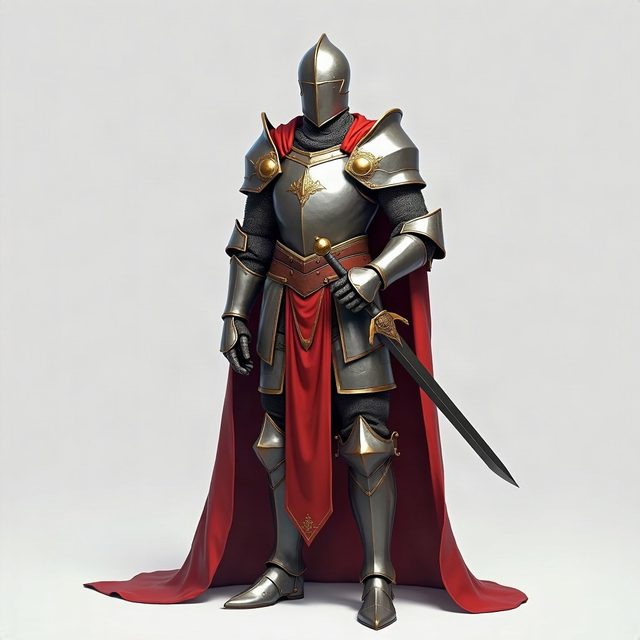
Make a game-ready model with Auto-rig on, or press Rig on a finished one: HI3D.cc fits a 24-bone humanoid skeleton and three animations, idle, walk and run, and hands you GLB and FBX files for 30 credits. The knight above was rigged on the live site on 10 October 2026: 51 seconds from pressing Rig to watching it walk.
| Step | What happens |
|---|---|
| Model | A game-ready model from your photo, made in an A-pose so the arms clear the body (60 credits, 2–3 minutes), or any finished full-colour model |
| Rig | A 24-bone humanoid skeleton fitted inside the mesh and skinned to it, at the character height you set (0.2–3 m, 1.8 m unless you change it) |
| Animations | Idle (a 4-second loop), walk (1.07 s per cycle) and run (0.67 s per cycle) |
| Materials | The model's own colour, normal and metal/roughness maps put back on every GLB |
| Preview | Rigged ✓ plays idle, walk and run in your browser before you download anything |
How to
Rig a character, step by step
- Start from a photo of one character, the whole body in frame, feet included. A figure standing with its arms a little away from the body gives the cleanest rig.
- Choose Game-ready and turn on Auto-rig (+30). The model is generated in an A-pose and rigged straight after, 90 credits in all. Already have a finished model? Open it and press Rig.
- Set the character's height in metres: 1.8 for an adult, about 1.2 for a child, 0.3 for a toy. The skeleton comes out at that real-world scale in your engine.
- Wait about 2 minutes. You can close the tab; the rigged model lands in your library.
- Press Rigged ✓ to watch idle, walk and run on your model, then Download the GLB or FBX files.
Before you rig
Which characters rig well
- Humanoid: a head, two arms, two legs. People, armoured figures, two-legged robots and cartoon characters fit; animals, vehicles and objects don't.
- Arms away from the body: an A-pose or T-pose. Arms pressed to the sides get skinned to the torso and drag it along. The game-ready preset poses the model for you; a full-colour model keeps the pose of the photo.
- Close-fitting clothes and armour move best. Capes, long coats and skirts stretch between the legs when the character walks or runs; watch the knight's cape in Run.
- Hands stay as modelled. The skeleton has no finger or face bones, so fists stay fists and faces don't talk.
What you download
Files and skeleton
| File | What it is |
|---|---|
| Rigged character (GLB, FBX) | The model with its skeleton, standing still: the one to retarget other animations onto |
| Idle (GLB, FBX) | The character standing idle, a 4-second loop |
| Walk, Run (GLB, FBX) | Walk and run cycles in place, 1.07 s and 0.67 s per cycle |
| Walk, Run, light (GLB) | The skeleton and its motion in under 0.1 MB each, for reusing the walk or run on another character with the same skeleton |
The 24 bones: hips; three spine bones; neck and head with two small helper bones at the head; shoulder, upper arm, forearm and hand on each side; upper leg, lower leg, foot and toe on each side. A whole rigged set came to between 45 and 64 MB across 10 files in our runs, most of it the 2K textures repeated in each GLB.
Measured
Our rig runs, timed
| Date | Character | Rigging |
|---|---|---|
| 29 Sep 2026 | Two-legged robot figure, game-ready | 91 s |
| 30 Sep 2026 | Knight with cape, game-ready | 121 s |
| 10 Oct 2026 | Knight with cape, on the live site | 42.9 s (51 s to the preview) |
We quote about 2 minutes. Times are the rigging alone; making the game-ready model before it takes 2–3 minutes. All our measured numbers, with dates, are on the facts page.
In your tools
Using the rigged files
- Blender: File → Import → glTF 2.0, and pick the rigged character. Import the walk and run GLBs too: each brings its action, which you can assign to the character in the Action Editor because the bone names match.
- Unity: drag the FBX files into Assets. They import with a Generic rig by default; the clips sit under each FBX, ready for an Animator Controller.
- Unreal Engine: import the rigged character FBX as a Skeletal Mesh, then the walk and run FBX files as animations on the same skeleton.
- The web and AR: the GLB files play in any glTF viewer with their animations; the preview above is one.
Questions
Auto-rigging, answered
How long does auto-rigging take?
About 2 minutes. In our three logged runs the rigging itself took 42.9, 91 and 121 seconds; on the live site on 10 October 2026 the knight above was playing its walk 51 seconds after Rig was pressed. You can close the tab while it works: the rigged model is in your library when it's done.
What does auto-rigging cost?
30 credits, about $1.20 with the Starter pack. A game-ready model with Auto-rig on is 90 credits in one go. If rigging fails, the 30 credits come back automatically and the model itself is kept.
Can I rig a model I made somewhere else?
Not at the moment. Rig works on models made on HI3D.cc, full-colour or game-ready. Print meshes aren't rigged: they're built for printing, without a pose a skeleton can follow.
Can it rig an animal, a robot with four legs or an object?
No. The skeleton is humanoid: a head, two arms and two legs. A two-legged robot or armoured figure works; a dog, a horse, a car or a chair doesn't, because there is no humanoid skeleton to fit inside it.
Why does the cape or skirt stretch when the character walks?
Auto-rigging gives every vertex to the nearest bones. A cape, a long coat or a skirt is a sheet hanging between the legs, so it follows both legs and stretches when they part. Body-hugging clothes and armour move cleanly. For a long garment, either accept some stretch for walk cycles or rig a version in shorter clothes.
Can I add other animations?
Every rig comes with idle, walk and run. The skeleton uses common humanoid bone names (Hips, Spine, LeftArm, LeftUpLeg and so on), so other humanoid animations can be retargeted onto it with your engine's retargeting tools.
Does the rigged model keep its textures?
Yes. The rigging step hands back the mesh with its colour wired into emission and without its normal and metal/roughness maps; we put the original PBR material back on every GLB before you download it, so the rigged character looks like the model you approved.
GLB or FBX?
FBX for Unity and Unreal Engine; GLB for Blender, the web and anything that reads glTF. Both come with every rig, for the character on its own and for each animation.
Need the model first? Image to 3D model. Want to see it in your room? View a 3D model in AR.