
Image to 3D
From one photo to a textured 3D model in about 7 minutes
Upload one photo and HI3D.cc builds a textured 3D model from it: a clay shape preview you can rotate after about 3 minutes, then 4K geometry with 2K PBR texture maps, delivered as GLB, FBX, OBJ, USDZ, STL and 3MF. In our timed runs the 4K model took between 241 and 702 seconds once the preview was done.
| Step | What you get | Measured time |
|---|---|---|
| Upload | Your photo is shrunk to 2,048 px on your device, then sent. Photos are deleted after 30 days. | seconds |
| Shape preview | An untextured clay model to rotate and check from every side | 138–177 s |
| Stop window | Stop here and the 60 credits for the 4K run come straight back | 30 s |
| 4K model | 4K geometry, about 40,000 triangles, base colour, metallic, roughness and normal maps at 2,048 px | 241–702 s |
| Saving | Six formats in your private library, and an email when it's done | ~30 s |
You can close the tab at any point after the upload. The run keeps going on our side, and the finished model waits in your library. Every number above comes from paid test runs we logged; the facts page lists each one with its date.
Your photo
Which photos turn into good 3D models
The engine reads the outline, the shading and the colours of one object, and invents whatever the camera didn't see. So the photo decides most of the result. Here's what we've seen work and fail.
Works well
- One object, the whole thing in frame, nothing cut off at the edges
- A plain background and soft, even light: a window on an overcast day beats a flash
- The object filling most of the frame, shot at eye level
- A three-quarter view when the side matters as much as the front
- Full-body people standing clear of others, hands visible
Expect trouble
- Groups and busy scenes: crop to one subject first
- Glass, water and mirrors: we haven't validated them, and they tend to come out solid
- Hard shadows and blown highlights: they get baked into the colour map
- Loose strands of hair or fur: fine strands turn into thin ribbons
- Objects partly hidden behind others
The back of your object is a guess. For backs and sides that match the real thing, use Multi-view (Pro and Studio plans) with two to four photos of the same object from different sides.
Real runs
Three image-to-3D runs we timed
These are the sample models in the workspace above. The input images were generated for the tests; none of them shows a real person.
| Subject | Preset | Times | Result |
|---|---|---|---|
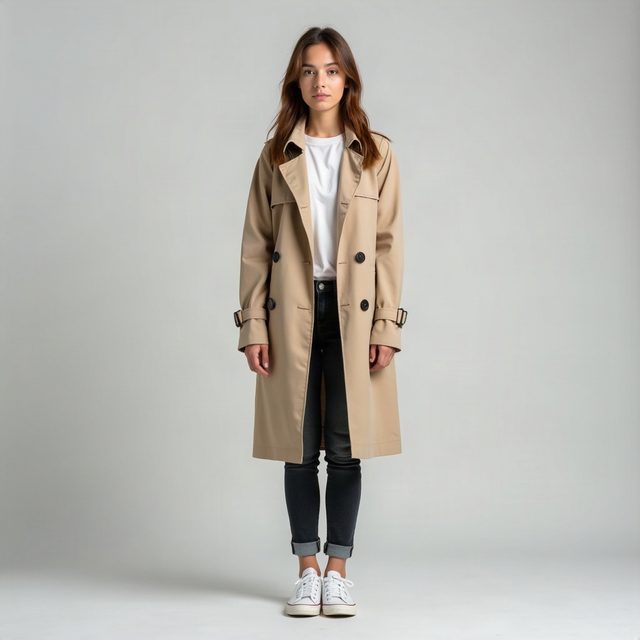
| Woman in a trench coat, full-body portrait | Full colour | preview 138 s, 4K 241 s | 41,262 triangles, four 2,048 px maps. Preview and final differ by 0.64% of the height on average: what you approve is what you get. |
| Mech robot, single image | Preview, then game-ready | preview 177 s, game-ready 124 s | 14,735 triangles with PBR maps; same parts and proportions as its preview (2.35% difference, mostly one arm's angle). |
| Knight with cape and longsword | Game-ready, then auto-rig | 158 s, rig 121 s | 15,160 triangles and a 24-bone skeleton. The cape stretches in the walk and run cycles; armour follows cleanly. |
Files
What you download
| Format | Use it for | Notes |
|---|---|---|
| GLB | Websites, three.js, model-viewer, Android AR, Blender | Textures embedded in one file |
| FBX | Unity, Unreal, Maya, 3ds Max | The rigged version adds a skeleton and animations |
| OBJ | Any 3D editor, ZBrush, older pipelines | A zip with the OBJ, its material file and four PNG maps |
| USDZ | AR Quick Look on iPhone and iPad | Opens straight from Safari |
| STL, 3MF | 3D printing | Any height from 10 to 2,000 mm; 3MF keeps the units |
Each format is its own download; the GLB of our portrait model is 12.7 MB. The copy you rotate on this page is a compressed web version of it: 1.27 MB, with every triangle kept and the maps at 1,024 px.
Limits
Worth knowing before you pay
- “4K” is the geometry. Texture maps are 2,048 × 2,048 pixels.
- Materials are inferred from the photo. In our portrait test the jeans came out shiny, like leather. Check the Textured and Clay views before you ship.
- Colour models aren't guaranteed watertight. For printing, use the 3D print preset, which repairs the mesh and checks it.
- No .blend file. Blender imports the GLB and FBX directly.
- Rigging doesn't simulate cloth. Capes, long coats and skirts stretch when the character walks or runs.
Questions
Image to 3D, answered
Is image to 3D free on HI3D.cc?
Trying it is. Every new account gets 40 credits, enough for a shape preview of your own photo, and the four samples on this page play for free without an account. The finished 4K model costs 100 credits (40 for the preview, 60 for the 4K run), which works out to $4.00 with the $12 Starter pack.
How long does it take to turn an image into a 3D model?
The shape preview arrives in 2 to 3 minutes (138 and 177 seconds in our timed runs). The 4K model follows in 4 to 12 minutes; our three timed 4K runs took 241, 281 and 702 seconds. Our full-body portrait went from upload to finished model in about 7 minutes, including the 30-second window in which you can stop.
Can I turn a photo of a person into a 3D model?
Yes. A full-body, front-facing photo works well: in our test the face, hair, coat buttons, rolled jeans and shoes all came through, and the back was filled in convincingly. You need the person's permission, and using their likeness commercially needs their consent.
Does the model keep the pose from my photo?
The full-colour and 3D print presets keep the pose in your photo. The game-ready preset stands the character in an A-pose so it can be rigged. You can switch between As is, A-pose and T-pose before you generate.
What size should my photo be?
A normal phone photo is plenty. The page shrinks it to 2,048 pixels on the long side before uploading, so large files are fine. What matters more is that the object fills most of the frame and nothing is cut off at the edges.
Which file should I use on a website or product page?
GLB for web viewers such as model-viewer or three.js and for Android's Scene Viewer; USDZ for AR Quick Look on iPhone and iPad. Both come with every full-colour model, along with FBX, OBJ, STL and 3MF.
Can I edit the model afterwards?
Yes. GLB and FBX open in Blender, Maya, 3ds Max, Unity and Unreal; the OBJ download is a zip with its material file and the four texture maps, so it opens textured in most 3D editors.
Printing it? Read how to turn a photo into a 3D print. Selling it? See the license.