Guide
How to turn your anime character or OC into a 3D model
Checked · numbers from our logged runs, 11 and 12 October 2026
Short answer
Use one clear, full-body, front-facing picture of the character, coloured if you can, on a plain background. An image-to-3D tool builds it in about 5 minutes; on HI3D.cc a pencil sketch is coloured for you first. For a back that matches your design, give it a turnaround: front, side and back as separate pictures. Then rig it to walk, print it, or take it into Blender or a game engine.
The examples below are our own: a pencil sketch by our founder, a crayon drawing we generated for testing, and the founder's character built from four views. They went through the same steps yours would, and the numbers are from those runs.
One picture, or a turnaround?
An image-to-3D engine sees the side of the character you show it and invents the rest. Whether that's good enough depends on how much the back of your design matters.
| You have | Use | What you get |
|---|---|---|
| One drawing, front or three-quarter | An ordinary one-picture run | 4K geometry, 2,048 px colour, normal and metal/roughness maps. The back is a plausible guess |
| A turnaround: front, side, back, other side | Multi-view, 2–4 pictures (Pro and Studio plans) | 2K geometry, the same 2,048 px maps. The back and sides follow your drawings |
If your character sheet has all the views in one image, cut it into one picture per view first: Multi-view reads each picture as one side of the character.
Getting the art ready
- The whole character, head to feet, standing, facing you or turned a little. Anything cut off by the edge comes back cut off or guessed.
- Arms a little away from the body if you'll animate it. Arms drawn against the sides get skinned to the torso when it's rigged, and drag it along when they move. On HI3D.cc you can also choose A-pose under Pose, and the model is built with the arms out; our Carrot girl run used it.
- One character per picture, on a plain background. Two characters of equal size are merged; HI3D.cc's picture check makes such a picture into one miniature diorama on a base instead, so neither is lost.
- Leave off effects and lettering. Sparkles, speed lines, speech bubbles and text drawn over or touching the character can end up built into it.
- Draw thin parts boldly. Fine hair strands come out as thin ribbons, so keep strands, ribbons, antennae and weapons a little thicker than you would on paper.
- Big heads are fine. Chibi and anime proportions build well: Carrot girl's head is about half her height.
Pencil, line art or colour
A drawing has no shading for the engine to read depth from, and pencil has no colour. Built exactly as photographed, a drawing comes back as a flat sheet of paper or a colourless figure. Our two tests on 12 October 2026, with the site's own settings:
| Drawing | Built as it was | After HI3D.cc's picture check |
|---|---|---|
| Our founder's pencil sketch of a girl, photographed on a table | The right shape, but white: 41,101 triangles, 276.8 s | Redrawn as a full-colour figure first, colours chosen for it: 41,163 triangles, 286.2 s |
| A crayon cat, generated for the test as a child's drawing on a kitchen table | A flat sheet of paper with the cat printed on it | The cat on four legs, its orange stripes kept; under 7 minutes from upload to finished model on the live site |
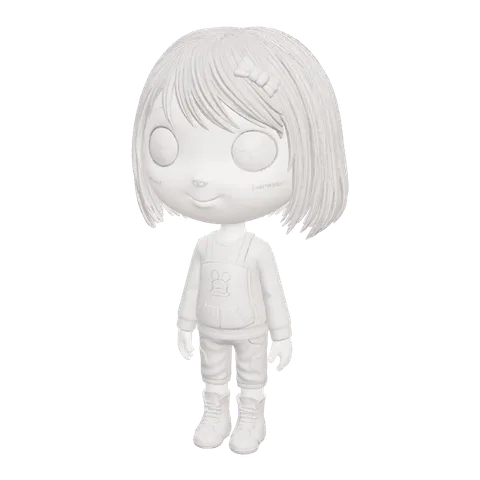
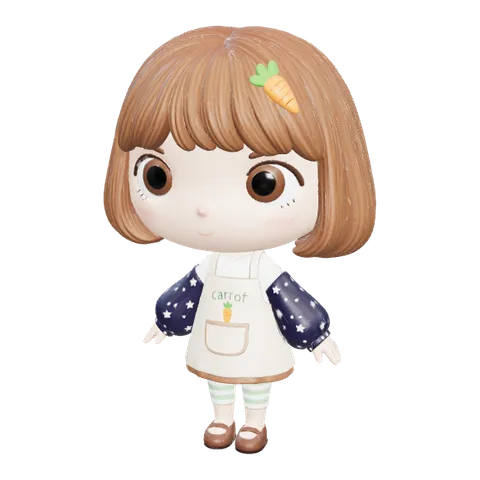
The check keeps the colours a drawing has and invents them only where it has none, so colour your drawing yourself if the colours matter: a quick flat colouring with markers or in a drawing app beats any guess. The before-and-after of each step, with the redrawn pictures, is on image to 3D.
Make it move
A humanoid character, with a head, two arms and two legs, can be rigged in one step: Auto-rig (30 credits) fits a 24-bone skeleton inside the model and adds idle, walk and run animations, as GLB and FBX. We quote about 2 minutes; Carrot girl's took 50 seconds.
- No finger or face bones. Hands keep the pose they were modelled in, and faces don't talk or blink.
- Long skirts, capes and coats stretch between the legs when the character walks or runs. Close-fitting outfits move best.
- Four legs, wings as limbs, no legs: not humanoid, so no rig. A two-legged robot or mascot works.
Where you can take it
| Where | File | What to know |
|---|---|---|
| Blender | GLB | File → Import → glTF 2.0. The walk and run GLBs bring their actions; the bone names match, so they play on the character |
| Unity | FBX | Imports with a Generic rig; the clips sit under each FBX, ready for an Animator Controller |
| Unreal Engine | FBX | Import the rigged character as a Skeletal Mesh, then the walk and run as animations on the same skeleton |
| VRChat, VTuber apps | Not directly | VTuber apps mostly load VRM; VRChat avatars are set up in Unity with its SDK. Both want a face rig the model doesn't have: add shape keys in Blender, then export with the VRM add-on or set it up in Unity |
| Your phone, in AR | USDZ, GLB | Place the character on your desk or floor: see viewing a 3D model in AR |
Printing your character
Carrot girl's print check came back watertight after 19 small holes were closed (48 triangles). At 100 mm tall she's 66 × 100 × 52 mm and 86.1 cm³ solid, about 107 g of PLA before your slicer hollows her out with walls and infill.
- Print upright, with supports under the hair, the chin and the arms. A big chibi head overhangs a lot.
- Resin below about 60 mm. Faces and eyes that small hold far better than on a 0.4 mm FDM nozzle.
- The 3D print preset (40 credits) builds a denser, repaired mesh for printing. Steps and slicer settings: photo to 3D print.
- Paint from the colour model. Its texture is the colour reference, in the colours the redraw chose or yours.
Your OC, or someone else's character?
- Your own original character: the design is yours, and models made with purchased credits on HI3D.cc carry a commercial license for prints, games, apps and ads. Copyright in AI output itself is limited; our commercial-use guide explains what that means.
- A character you don't own, from an anime, a game or a brand: a model for your own shelf is one thing, but selling prints or files of it can infringe the owner's copyright and trademarks however the model was made. Some studios publish fan-work guidelines; read them before you sell anything.
- Someone else's drawing, even of your character: upload it only with the artist's permission. HI3D.cc's terms ask that you have the rights to what you upload.
Questions about turning characters into 3D
Can I turn a drawing of my OC into a 3D model?
Yes. A full-body, front-facing drawing of one character is enough for a textured 3D model in about 5 minutes; the back is inferred from the front. For the back of your own design, give the tool a turnaround (front, side, back) instead of one picture.
Does it work with a pencil sketch or line art?
Built as it is, a pencil drawing comes out with the right shape but no colour: our test came back white. On HI3D.cc the picture check redraws an uncoloured drawing as a full-colour figure before the 3D step, choosing colours for it, so colour the drawing yourself first if the colours matter.
How do I get the back of my character right?
Draw or generate the back and the sides, and upload them as separate pictures with Multi-view (2 to 4 pictures, on the Pro and Studio plans). Keep the same size, pose and outfit in every view. Our Carrot girl run from four views was built, textured and rigged in 10 minutes 46 seconds.
Can I animate my character?
Yes, if it's humanoid: a head, two arms and two legs. Auto-rig (30 credits) fits a 24-bone skeleton with idle, walk and run animations, as GLB and FBX, in about 2 minutes. It has no finger or face bones, so hands keep their modelled pose and faces don't talk.
Can I use my 3D character as a VRChat or VTuber avatar?
Not straight away. Most 3D VTuber apps load VRM avatars and move the face with blend shapes, and VRChat avatars are set up in Unity with VRChat's SDK, with visemes for lip sync. The rigged model has a body skeleton but no face rig, so add shape keys in Blender first, then export VRM with the VRM add-on for Blender or set it up in Unity.
Can I sell 3D prints of my anime character?
Of your own original character, yes: models made with purchased credits on HI3D.cc carry a commercial license. Of a character someone else owns, from an anime, a game or a brand, selling prints or files can infringe their copyright and trademarks however the model was made. This isn't legal advice.
How much does it cost?
Sources
- The pencil and crayon tests: one run each with the site's own settings on 12 October 2026; engine times from the engine's own log, triangles read from the model files.
- Carrot girl: a Multi-view run on the live site on 11 October 2026, each step timed, the print check measured on her print file. Open her in the workspace's samples.
- Rigging: auto-rigging; every measured number with its date: HI3D.cc facts.