Guide
How to turn a photo of a person into a 3D model (or a bust)
Checked · numbers from our logged test runs, 12 October 2026
Short answer
Take one sharp photo of the person on their own: the whole body in frame for a figure, head and shoulders for a bust. An image-to-3D tool turns it into a textured model in about 5 minutes, which you can turn round, place in a room with AR, rig or print. The face comes out softer than in the photo, and the back is the tool's best guess.
The rest is what we'd tell a friend before they try: how to frame the photo, what the model keeps and loses, how to get a bust, and whose face you may use.
Figure or bust: the photo decides
An image-to-3D engine builds what the photo shows and stops where the photo stops. Frame the photo for the model you want, before you upload, because there's no setting that turns one into the other afterwards.
| You want | Frame the photo | Why |
|---|---|---|
| A standing figure, a game character, a figurine | Head to feet, standing, arms a little away from the body | Feet cut off by the edge come back cut off or guessed |
| A bust | Head and shoulders, or down to the waist, the face large in the frame | The face gets more of the picture, so more of its detail survives |
| Two or more people | One photo each | People of equal importance in one photo get merged into one shape |
On HI3D.cc every one-photo run gets a picture check first (2.9 seconds on the live site). A subject cut off by the edge by accident is completed, and a group with no main person becomes one miniature diorama on a round base. In our test, the check left a waist-up portrait as it was, framed that way on purpose, rather than inventing legs for it.
The photo, for people
- One person, nothing in front of them. What's behind them doesn't matter: in our park test, the people walking past and the trees were left out of the model.
- Face to the camera, eyes open, soft light. Daylight from a window beats a flash. Hard shadows and glare get painted into the model's colours.
- Hands empty and clear of the body. A phone, a cup or an instrument held against the body is the part most likely to come out fused to it or broken off. Put it down for the photo.
- Hair tied back if you'll print it. Loose strands come out as thin ribbons that print badly.
- Glasses are glass, which we haven't validated; expect the lenses to come out solid.
- A sharp, full-resolution photo. Your phone's camera is plenty; a screenshot or a photo forwarded through a chat app has lost detail already.
If the back has to be right, not just plausible, take two to four photos from different sides and use Multi-view (Pro and Studio plans). It builds at 2K geometry instead of 4K, with the same 2,048-pixel textures.
What comes out: our test
We generated this photo for our tests: a man in a busy park, standing on his own, people walking past behind him. It went through the site's own settings on 12 October 2026, untouched by the picture check because it shows one whole person.
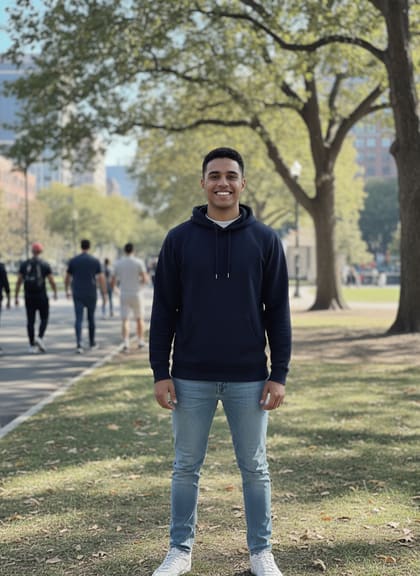
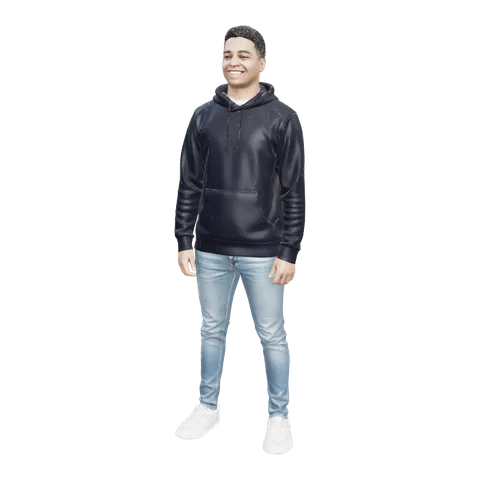
| Our park test | Result |
|---|---|
| Engine time | 227.9 s |
| Triangles | 41,463 |
| Texture maps | Colour, normal and metal/roughness, 2,048 × 2,048 px |
| Kept | Face, short hair, the hoodie's drawstrings and pocket, the jeans, white trainers |
| Left out | The people behind him, the trees, the path |
| Worth knowing | Faint light seam lines across the dark hoodie; the face, about a tenth of the photo's width, is recognisable but smoother than in the photo |
Our other person, the woman in a trench coat in the workspace's samples, came out at 41,262 triangles from one photo, also generated for our tests. Open her there to turn her round, measure her or place her in your room with AR.
From a full figure to a bust, without a second run
If you already have a full-body model and want a bust for a desk or a shelf, cut it yourself in Blender (free). Five minutes, no new model to pay for:
- File → Import → glTF 2.0, and pick the GLB.
- Select the model, press Tab for Edit Mode, then A to select everything.
- Mesh → Bisect, and drag a line across the chest. In the panel that appears, tick Fill, and Clear Inner or Clear Outer, whichever removes the legs.
- For a base, press Tab back to Object Mode, Add → Mesh → Cylinder, flatten it (S, Z) under the cut, select both and join them with Ctrl + J.
- File → Export → STL and set the height in your slicer. STL has no colour; keep the GLB as your painting reference.
The cut face is flat, so the bust stands on it without supports. Cropping the photo to head and shoulders and making a new model instead gives the face more detail, at the price of another run.
Printing a person
- Use the 3D print preset (40 credits) for anything you'll print. It builds up to 300,000 triangles, against about 40,000 for a full-colour model, and repairs the mesh where that's safe. Our full-colour trench-coat sample still had 73 open and 85 non-manifold edges; slicers close small gaps like these, but a print mesh starts cleaner.
- 60–120 mm tall suits a desk bust or figurine on an FDM printer. Faces below about 60 mm hold far better on a resin printer than on a 0.4 mm nozzle.
- Layers of 0.12–0.16 mm for faces on FDM, and supports under the chin, the arms and anything overhanging more than about 45°.
- Paint from the colour model. The full-colour GLB shows the colours the engine read from the photo, which makes a better reference than the photo alone.
The step-by-step, from the print mesh and the print check to slicer settings, is in how to turn a photo into a 3D print.
Whose face you may use
- Ask first. Make models of people who agree, and say what you'll do with the model: a print for their desk is one thing, a game character or an online shop another.
- Selling needs consent. Many places protect a person's likeness (in the US, the right of publicity), and a recognisable figurine sold without consent can breach it no matter how it was made. Our guide to using AI 3D models commercially covers it with sources.
- Your upload, your rights. HI3D.cc's terms ask that you have the rights to what you upload.
- Where the photo goes. It's kept in private storage and deleted 30 days after the run; the model stays private unless you turn on its share link; neither trains AI models (our privacy policy).
When it goes wrong
| Problem | Likely cause | Fix |
|---|---|---|
| The face looks soft or generic | The face was small in the photo | Crop to head and shoulders; use the original photo, not a forwarded copy |
| Two people became one shape, or a diorama | More than one person in the photo | One person per photo |
| Something they held is fused or missing | An object held against the body | Put it down for the photo, or model it separately |
| The back of the head or body looks invented | The back is inferred from the front | Multi-view with 2–4 photos from different sides |
| Shadows painted onto the clothes | Hard light or a flash | Even daylight, no flash |
| Feet missing | The photo cut off at the ankles | Include the feet, or crop higher on purpose for a bust |
Questions about 3D models of people
Can AI make a 3D model of a person from one photo?
Yes. One clear photo of one person is enough for a textured 3D model: the front comes from the photo, and the sides and back are inferred. Our test from a single photo of a man in a park took 227.9 seconds of engine time and came out at 41,463 triangles with 2,048-pixel texture maps.
Will the 3D model look like the person?
It will resemble them, with the face a little softer than in the photo. The face only gets as many pixels as it has in the picture, so in a full-body shot it loses more detail than in a head-and-shoulders crop. For a likeness that matters, such as a bust or a gift, crop the photo to the head and shoulders.
How do I make a 3D bust from a photo?
Upload a head-and-shoulders or waist-up photo: the model ends where the photo ends, so it comes out as a bust. If you already have a full-body model, cut it at the chest in Blender with Mesh, Bisect and Fill, then add a base. Print it 60–120 mm tall, or on a resin printer below that.
Can I make a 3D model of a group photo?
Not of each person separately. Several people of equal importance in one photo get merged; on HI3D.cc the picture check turns such a photo into one miniature diorama on a round base so nobody is lost. For one model per person, use one photo per person.
Is it legal to make a 3D model of someone?
Make models only of people who agree to it. Many places protect a person's likeness, and selling a recognisable figurine or bust without consent can breach that however it was made. This isn't legal advice; our commercial-use guide covers likeness and publicity rights in more detail.
What happens to the photo I upload?
On HI3D.cc it's kept in private storage and deleted 30 days after the run. The model stays private unless you turn on its share link, and neither is used to train AI models.
How much does it cost?
Sources
- The park test: one run with the site's own settings on 12 October 2026, engine time from the engine's own log; triangles and texture sizes read from the model file.
- The picture check's timing and rules: image to 3D; every measured number with its date: HI3D.cc facts.
- Printing: image to STL and photo to 3D print; likeness and selling: commercial use.